Fewer messages, better ones: Introducing our new notifications engine

Most engineering leaders have the same complaint about alerts: there are too many of them, and they arrive without context.
Today we are rebuilding how Kindor keeps you informed. Instead of one message per warning, Kindor now sends short digests, each written for a specific reader, and gives admins a single place to control them.
Three digests, three questions
Daily Action answers "What needs my attention today?" Each weekday, contributors get one short list of their own work that needs a nudge: tasks that are overdue or due today, pull requests waiting for review, work that has been in progress for too long. It shows the five most important items, and if more were waiting, it tells you how many.
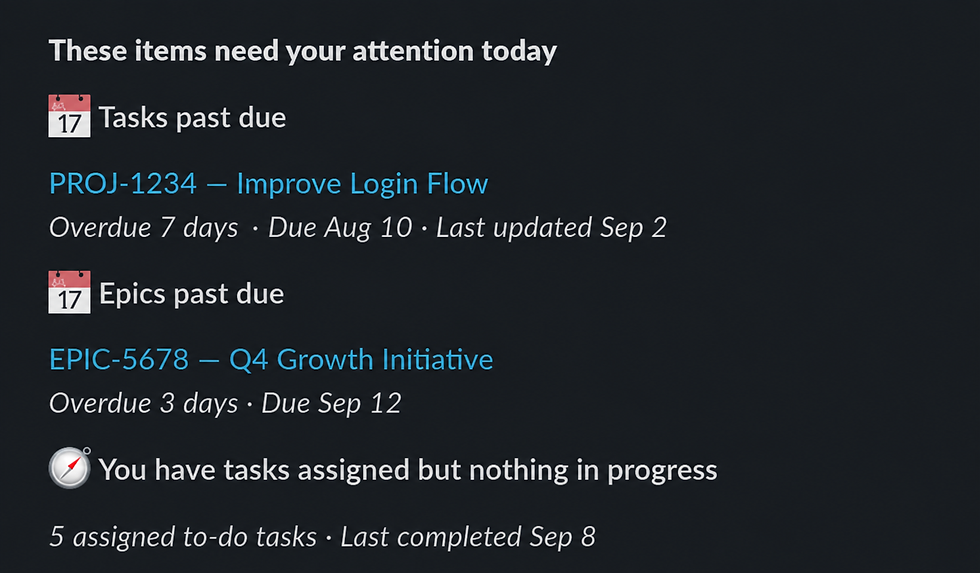
Daily Coach answers "What can I quickly fix?" It points out gaps that make your data less trustworthy: an in-progress task with no estimate, an epic with no due date or other data inconsistencies. Fixing them takes minutes, and it keeps your dashboards honest.

Weekly Pulse answers "What changed on my teams this week?" Every Monday, managers get one message covering their whole reporting line, with only the changes that matter:
Data quality & Process Adherence
Delivery efficiency
Team activity
Initiative progress
Recognition
Every finding comes with the right context, "62%, down 14 points against the recent median", and a few named examples, so you know where to look first.

Built to be quiet
A notification you learn to ignore is worse than none, so the digests are deliberately restrained:
One message per person per day, never one per warning.
Daily digests are capped at five items. Each Weekly Pulse section has room for just a couple of findings.
A finding only appears when something meaningfully changed, not because a number exists.
If there is nothing to say, Kindor sends nothing.
The Weekly Pulse report compares each week against your own recent history to notify only on what is really worth knowing and includes a link to a dashboard with more details in case you need them.
You are in control

Everything above is configured in the Kindor settings under the Notification Center Section. Each check Kindor can run has its own row, and for each one you can decide:
Track this: Kindor measures the check for the teams you choose. Tracked checks feed the Weekly Pulse.
Notify as it happens: the check also appears in the daily digests. Turn this off to watch a metric quietly before deciding whether it should ever interrupt anyone.
Which teams it applies to, so one team can adopt a practice ahead of the rest.
Thresholds, where a check has one, such as how many days without commits counts as a gap.
Each row explains in plain language what Kindor looks for and how it is measured, so you can decide with the full picture.
Where you will get them
Digests arrive by default in Slack as direct messages. If your organization does not use Slack with Kindor, they arrive by email instead.
What changes for you
The digests replace the previous Kindor Advisor warnings. As part of this redesign a small number of older alerts that rarely proved useful have been retired. Your existing team and rule settings carry over.
A core set of checks is on from day one, and cannot be switched off. Checks that are new to Kindor and configurable start switched off for your teams until you turn them on in the Notification Center.


Comentarios